
HyperHand
Let Claude Code, Codex, or any MCP client see and operate a Hyper-V Windows VM: screenshots, mouse, keyboard, commands, files, and checkpoints, with no guest network or password.
Developers who want Claude Code, Codex, or another MCP client to operate Windows virtual machines on Hyper-V.
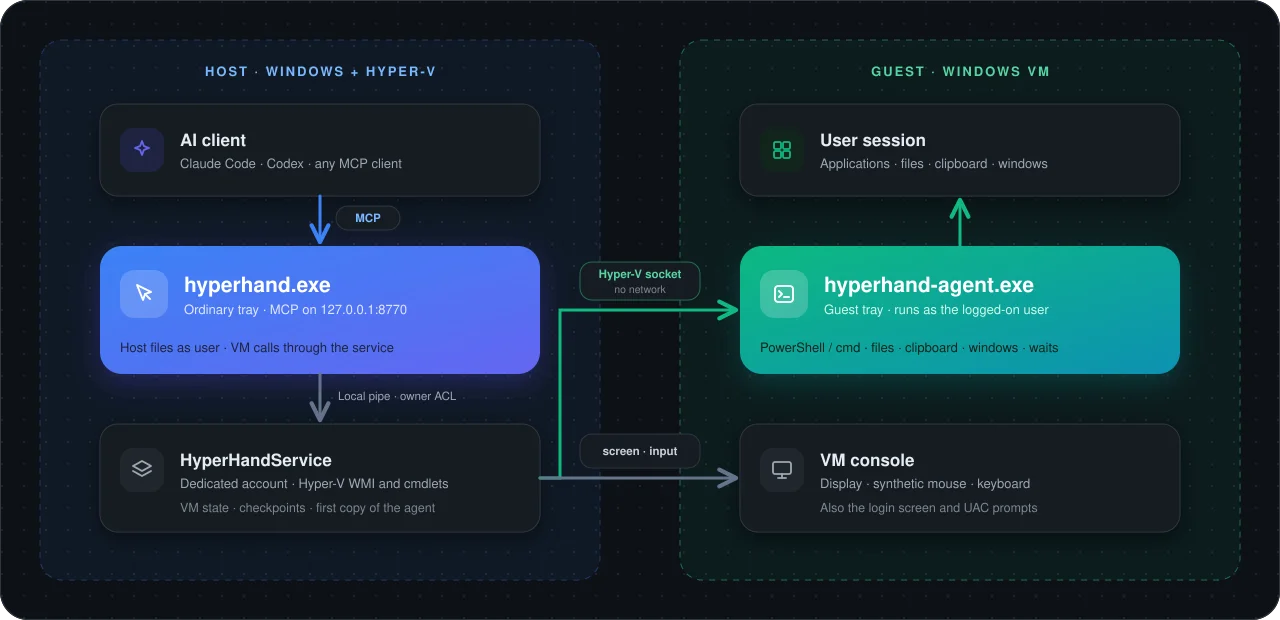
Overview
- MCP server that lets an AI agent see and operate a Windows VM on Hyper-V the way a person at the keyboard would.
- Screenshots, mouse, keyboard, commands, programs, file transfer and checkpoints. Screen and input go through Hyper-V, so they also work on the sign-in screen and UAC prompts.
- Before clicking or typing it brings the right window to the front and checks the target; if the screen changed since the AI last looked, it refuses instead of clicking blindly.
- The VM needs no network connection, and the AI never needs the guest password. No UAC prompts in everyday use.
Common Uses
- Test installers and builds in a clean Windows, then roll the VM back for the next run.
- Automate desktop programs that have no API.
- Reproduce problems reliably by restoring the same checkpoint as often as needed.
- Keep commands, downloads and experiments off your own computer.
Requirements
- A Windows 10 or 11 Pro or Enterprise host with Hyper-V, and administrator approval for installing, updating and uninstalling.
- A Windows guest with a user logged on. Sign the user in automatically, or store an unlock password in the HyperHand tray.
- Virtual Machine Connection in basic session mode, not enhanced session.
- An MCP client that supports Streamable HTTP, such as Claude Code, Codex or Cursor.
Install
- 1
Download hyperhand-X.Y.Z-windows-amd64.zip from GitHub Releases and extract both executables to the same folder.
- 2
hyperhand.exe install
- 3
Approve the UAC prompt once. HyperHand installs to %ProgramFiles%\HyperHand, and its tray icon appears.
Configure
- 1
Claude Code: claude mcp add --transport http hyperhand http://127.0.0.1:8770/mcp
- 2
Codex: codex mcp add hyperhand --url http://127.0.0.1:8770/mcp
- 3
Other clients: add a Streamable HTTP server with the URL http://127.0.0.1:8770/mcp, then start a new session.
- 4
Start the VM, log on and switch the guest keyboard to English, then ask the AI to install the guest agent. The agent starts at every logon from then on.
- 5
To change the port, open the tray settings window, check Change port and click Apply and restart.
Tools / Commands
- vm_list, vm_start, vm_shutdown, vm_turn_off: list VMs, start one and wait for a usable desktop, shut down or turn off.
- vm_status, vm_unlock, vm_doctor: report state, unlock a locked session with the stored password, run read-only host and guest checks.
- vm_observe, vm_windows, vm_find_controls: screenshots of the screen or one window, visible windows, and the buttons, fields and menus a program exposes.
- vm_click, vm_drag, vm_scroll, vm_type, vm_key, vm_set_value, vm_invoke: mouse, keyboard and control actions, checked against the latest observation.
- vm_exec, vm_job, vm_apps, vm_launch: run PowerShell or cmd, run background jobs, find and start programs.
- vm_push, vm_pull, vm_file_info, vm_clipboard_get, vm_clipboard_set: copy files and folders in either direction, check guest files, use the guest clipboard.
- vm_checkpoints, vm_checkpoint, vm_restore, vm_checkpoint_keep, vm_checkpoint_delete: create, restore, keep and delete checkpoints.
- vm_wait, vm_end_turn, vm_install_agent, vm_update_agent: wait for a condition, end a task and clean up its temporary checkpoints, install or update the guest agent.
Resources / Settings
- hyperhand.exe runs as an ordinary tray program on the host and serves MCP at http://127.0.0.1:8770/mcp.
- HyperHandService runs the Hyper-V operations under its own dedicated account, so you do not need to be a Hyper-V administrator.
- hyperhand-agent.exe runs in the guest user's session to run commands, start programs, transfer files and read windows and controls.
- Host and guest talk over Hyper-V sockets. Unlock passwords are stored in Windows Credential Manager and never returned to the AI.
FAQ
Frequently asked questions and troubleshooting guides.